RadarNow! ®
- 4.8
- Rating
- 5.00M
- Installs
- Free
- Price
 Analysis by App-foxy
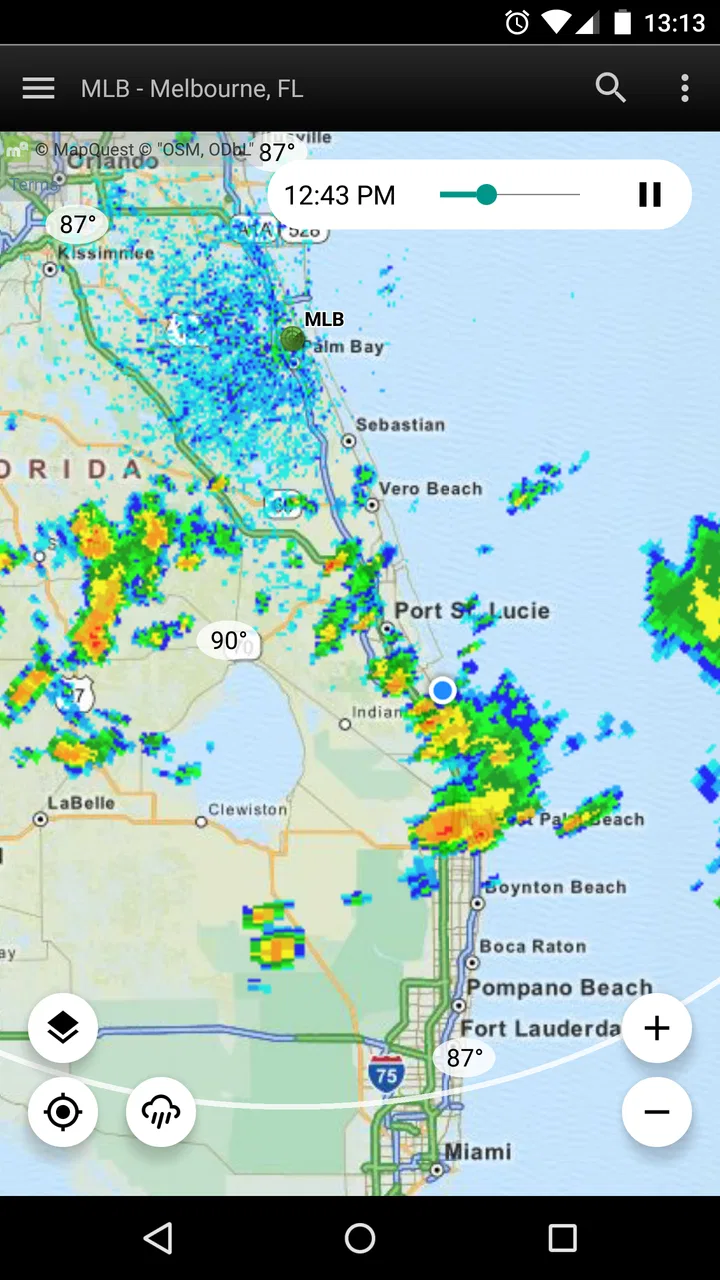
I like weather apps that help me make a decision quickly rather than burying the useful part under layers of decoration. RadarNow! ® takes that practical approach. It is a free weather app from USNaviguide LLC, focused on showing current NOAA radar imagery so I can check whether rain or storms are moving toward me. After using it as a quick visual reference, I found that its value depends less on long forecasts and more on how quickly I can open it, understand the radar, and decide whether to leave now or wait.
The app has built a strong following, with a 4.9 average from around 80 thousand ratings, about 27 thousand written reviews, and over 5 million installs. Those figures make sense to me because the purpose is immediately clear: open the app, look at the radar, and get a more direct view of nearby precipitation than a standard daily forecast usually provides. It is available free for Everyone, while optional in-app purchases can cost up to $18.99 per item.
Getting past the first points of friction
The first place many people get stuck is expecting RadarNow! ® to behave like a full weather dashboard. Its short store description presents it as “RadarNow!,” but the more useful way to think about it is as a radar-first tool. If I open it expecting a detailed lifestyle forecast, a large collection of widgets, or a long explanation of tomorrow’s conditions, I may feel that it is too narrow. If I open it because I want to know whether a rain band is approaching, the focused design makes much more sense.
You May Also Like

 Blood Strike: 2.5 Anniversary
Blood Strike’s Loadouts Turn Every Drop Into a Tactical Gamble
A close look at Blood Strike’s custom loadouts: how fast access to signature weapons reshapes its battle royale rhythm, rewards preparation, and narrows the gap between fights.

 Pandora - Music & Podcasts
Pandora’s Music Is Easy to Start, but Harder to Recover
Pandora’s strength is its low-effort path from a seed to a station. Its weak spot is how much confidence it asks you to place in connection, setup, and quiet recovery.

 8 Ball Pool
 Is Built on Rivalries, Rematches, and Routine
A close look at the rivalries, rematches, shared routines, and unanswered safety questions that turn a quick pool match into a persistent mobile community.

 Samsung Music
’s Quiet Strength Is Playing What You Already Own
Its reach comes less from spectacle than from dependable access to a personal library. That simplicity is both the app’s strongest retention engine and its ceiling.

 AccuWeather: Weather Radar
AccuWeather Review: A Quick, Clear Forecast for Everyday Decisions
For everyday plans, the best forecast is the one you can understand quickly. AccuWeather makes rain timing, radar, and local conditions easy to act on, with a few trade-offs.

 Hill Climb Racing
Why Hill Climb Racing Still Turns Crashes Into One More Run
A tiny car, a bumpy hill and one more upgrade: Hill Climb Racing keeps resurfacing because its simple chaos makes every near-miss feel personal.
More From Our News Desk



Another common stumbling point is interpreting the image itself. A radar display is not a promise that rain will fall on every street shown in a colored area. It is a visual picture of detected precipitation, and the important question is movement: is the area getting closer, spreading, weakening, or passing away? I get more value when I look at the latest image and then compare it with the previous movement instead of reacting to color alone.
That distinction matters during ordinary situations. Before walking to a bus stop, for example, I would not use one bright patch on the screen as a complete answer. I would check where the patch is relative to my location and whether its direction suggests that the walk will be affected. The app is especially useful for that kind of short-term judgment, while a conventional forecast may be better for planning an entire weekend.
The app runs on Android starting with version 7.0, and the current version is 7.2. That makes it accessible on many older devices, although the experience can still depend on the phone itself. A slow connection, an aging handset, or aggressive battery and background-data restrictions can make a radar image appear late. When the display seems stuck, I first check the basics before assuming the app is broken.
Simple setup checks that prevent misleading results
I begin by making sure the phone has a working internet connection. Radar imagery is not useful if the device is offline or switching unreliably between mobile data and Wi-Fi. A quick test in another app can tell me whether the problem is broader than RadarNow!. If other services also load slowly, restarting the app repeatedly is unlikely to solve the real issue.
Next, I confirm that the map is centered on the place I actually care about. A radar screen can look perfectly normal while showing the wrong area, especially after traveling or changing locations. Before interpreting the colors, I look for my current position or manually move to the relevant region. This is a small habit, but it prevents a surprisingly serious mistake: making a weather decision from a clear-looking map that is not centered where I am.
I also give the image a moment to refresh rather than judging it instantly after launch. If the display is still loading, a blank or incomplete view does not automatically mean that there is no precipitation. I prefer to wait for the current image to settle, then inspect the surrounding area. Closing and reopening the app can help after a temporary loading failure, but I would not keep repeating that step if the connection itself is unstable.
The most useful setup check is deciding what I need before opening the app. For immediate rain movement, I want the radar view. For temperature later in the day, I may need a different weather source. This expectation check saves time and keeps the app from being blamed for not serving a purpose it was never meant to replace.
A practical radar routine for everyday decisions
My preferred routine is simple. I open the app, locate myself, inspect the nearest precipitation, and then consider its direction and apparent movement. I do not treat a single screen as a complete forecast. Instead, I use the radar as a short-term observation tool and combine it with common sense about the trip I am planning.
For a school run or commute, I check the route rather than only the destination. A storm cell can miss the destination while crossing the road, station, or neighborhood where I will spend most of the time. This is one of the app’s less obvious strengths: the visual format encourages me to think spatially. A text forecast might say “rain nearby,” but the radar helps me ask where that rain is in relation to my actual journey.
For outdoor work, the app can be useful before starting a task that is difficult to pause. I might inspect the radar before washing a car, painting outside, gardening, or setting up equipment. The sensible workflow is not to search for a guaranteed all-clear. It is to look for approaching activity and decide whether the task has enough time to finish or whether postponing it is safer.
For driving, I use it before departure rather than while moving. The display can help me understand whether a difficult patch of weather is approaching, but it should not become a distraction behind the wheel. I would check it while parked, then rely on safe driving decisions and changing road conditions. Radar can show precipitation movement, but it does not replace visibility, traffic awareness, or local warnings.
One helpful habit is to compare the radar picture with what I can observe outside. If the screen suggests nearby precipitation but the sky is dry, that does not necessarily mean one source is wrong. The precipitation may be moving away, may be outside my exact location, or may not be reaching the ground in the same way. Treating the app as one input rather than an unquestionable authority makes the information more useful.
Recovering when the workflow breaks
When the image does not update, I work through the problem in a fixed order. First I check the connection, then the map area, then whether the app needs to be closed and reopened. If the phone is under heavy load, I give it a moment and close unrelated apps. These are ordinary steps, but they are better than changing several settings at once because they show which part of the process caused the failure.
If the map appears frozen, I compare what I am seeing with the weather outside and with another trusted source. That comparison is not about choosing a winner; it helps identify whether the issue is a stale display, delayed network access, or simply a quiet weather situation. I avoid making urgent decisions from an image that looks old or incomplete.
Location confusion deserves its own check. A radar app can be functioning normally while the phone’s location is outdated or the map is positioned somewhere else. I manually move the view to the area I need and use that as a temporary workaround. If the manually selected area loads correctly, the problem is more likely related to location context than to the radar service itself.
It is also worth remembering that a refresh problem can be caused by the phone’s settings. Data-saving modes, restricted background activity, weak reception, or a crowded network can interfere with loading. I would check those general conditions before reinstalling anything. Reinstallation is a last resort because it takes time and may not address a connection or location issue.
People sometimes ask whether paying for an in-app purchase is necessary to use the basic app. RadarNow! is free to download and use, so I would start with the free experience and decide whether any optional purchase fits my needs. The listed in-app purchase price of $18.99 per item is significant enough that I would not buy impulsively just to fix a display that is actually suffering from poor connectivity. A purchase should solve a clear need, not serve as troubleshooting.
When the app is not the cause
Radar information has natural limits that no restart can remove. A radar image is most helpful for seeing precipitation patterns, but it cannot tell me everything about local conditions. Wind damage, lightning risk, flooding, icy roads, visibility, and rapidly changing severe weather may require official alerts or local emergency information. I would never use a quick radar check as the only safety measure during dangerous weather.
There is also a difference between seeing precipitation and predicting exactly what will happen at my front door. A colored area on a regional display can cover a broad space, while my street may remain dry or receive a brief shower. Terrain, local conditions, and the distance between the radar observation and my location all affect how closely the image matches what I experience.
This is where a general weather app may be the better companion. If I need hourly temperatures, a multi-day outlook, pollen information, air quality, or a detailed forecast for travel planning, I would choose a service designed around those details. RadarNow! is more convincing when I need a visual nowcast than when I want a complete personal weather center.
The same trade-off applies to notifications and planning habits. I would not assume that opening a radar screen replaces setting up alerts in a dedicated weather or emergency service. For a severe-weather situation, official warning channels are more important than a casual glance at any radar display. The app can improve my awareness, but it should sit inside a broader safety routine.
Who will get the most from RadarNow!
I recommend it most strongly to people who think visually and frequently need short-term weather context. Commuters, cyclists, walkers, outdoor workers, event organizers, and anyone who wants to know whether a shower is approaching can understand the benefit quickly. It is also a useful second weather app for someone whose main forecast service feels too general when rain is already nearby.
The app is a good fit for older Android phones as well, since the minimum operating system is Android 7.0. That does not guarantee identical performance on every device, but it removes one barrier for users who do not have a recent handset. The Everyone age rating also makes it straightforward for households to consider, although younger users should still be taught not to treat weather information as a substitute for adult judgment during dangerous conditions.
I would be more cautious recommending it to someone who wants one app to manage every weather need. The radar-focused approach may feel incomplete if the user expects extensive forecasts, planning tools, or a polished dashboard with many categories of information. I would also steer away from relying on it alone for emergency decisions, long-distance travel, or conditions where official warnings matter more than a visual precipitation layer.
The app’s reputation is encouraging, with over 5 million installs and a 4.9 average, but popularity does not remove the need to test it against personal habits. Someone living in an area with frequent fast-changing weather may open it several times a day, while another user may find a standard forecast sufficient. The right question is not whether it is universally necessary; it is whether seeing current radar movement changes the decisions I make.
My practical verdict after using it
RadarNow! succeeds because it keeps the central task obvious: check the radar and understand what is happening nearby. I appreciate that focus. It does not ask me to read a long forecast when I only want to know whether the rain is moving toward my route. The strongest workflow is quick, visual, and repeated when conditions are changing.
Its main friction is also tied to that focus. Users must understand what radar can and cannot show, confirm that they are looking at the correct location, and avoid treating a delayed or incomplete image as current. Those are manageable issues, but they require more judgment than simply reading a temperature number. A few seconds spent checking the connection, map position, and image freshness can prevent a bad conclusion.
For me, the best role for this free weather app is as a fast radar companion rather than a complete replacement for every other weather source. I would install it if I often make decisions about leaving home, scheduling outdoor work, or waiting out a nearby shower. I would skip it if my priority is a detailed long-range forecast or comprehensive emergency information in one place.
My bottom line is simple: RadarNow! is most valuable when the question is “what is moving toward me right now?” Used with that question in mind, it is focused, accessible, and genuinely practical. Used as a complete forecast and safety system, it becomes a less suitable choice. That clear boundary is not a weakness to hide; it is the key to getting reliable value from the app.
FAQs for RadarNow! ®
01What is RadarNow!® and what does it offer?
RadarNow!® is a weather app that provides real-time radar images and weather alerts directly to your mobile device. It focuses on delivering the most up-to-date radar data, helping users track weather conditions with precision. The app is particularly useful for those needing immediate information about approaching storms or weather changes.
02How accurate is the weather data provided by RadarNow!®?
RadarNow!® leverages data directly from NOAA's National Weather Service radar, ensuring high accuracy and reliability. The app updates frequently to provide the most current radar images, which are crucial for tracking storms and other severe weather events. However, like any weather app, its precision can vary based on local conditions.
03Does RadarNow!® require a subscription or have in-app purchases?
RadarNow!® offers a free version with essential features, while a premium upgrade is available for users seeking advanced functionalities. The premium version includes features like ad-free usage, enhanced radar images, and additional map layers. These in-app purchases help support ongoing development and maintenance of the app.
04Is RadarNow!® user-friendly for beginners?
Yes, RadarNow!® is designed with a straightforward interface, making it accessible for users of all experience levels. The app emphasizes simplicity, providing clear and intuitive navigation. Beginners will find it easy to access real-time radar images and weather alerts without needing extensive technical knowledge.
05What permissions does RadarNow!® require on my device?
RadarNow!® requires certain permissions to function optimally, including access to your location for providing accurate local weather data. It may also request internet access to download radar images and weather updates. These permissions are standard for weather apps and are crucial for delivering a personalized user experience.
Pros
- Instant weather updates.
- Simple and user-friendly interface.
- Minimal storage space required.
- Real-time radar images.
- Accurate location tracking.
Cons
- Limited customization options.
- Ads can be intrusive.
- No detailed forecast features.
- Requires internet connection.
- Basic design with few themes.

RadarNow! ®
Gallery